Built with swisstopo elevation data

Coverage mapping that doesn't flatten
an alpine valley into a 30m grid.

Most coverage tools default to the same 30m global elevation model everywhere, which is a rough approximation over the kind of terrain fixed wireless links in Switzerland and Liechtenstein actually cross. GridVisio uses swisstopo's own 0.5m surface model — every building and tree line, across all of Switzerland and Liechtenstein — automatically, for every link check and heatmap.

Start 14-day free trial See the LoS checker
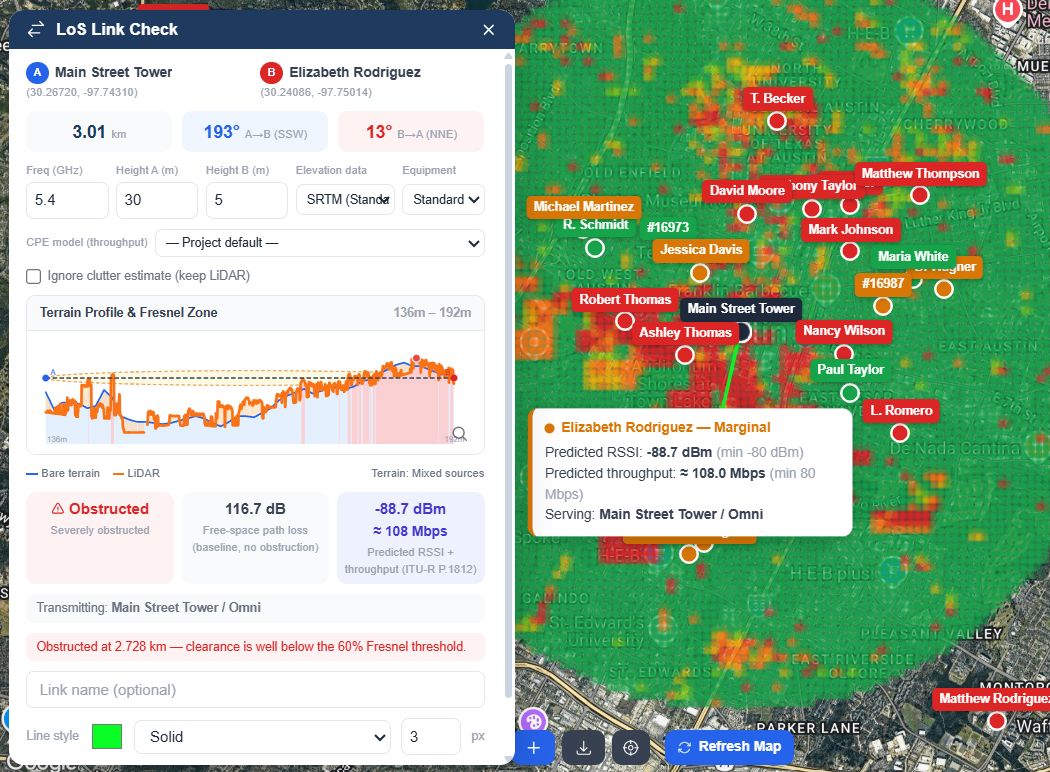
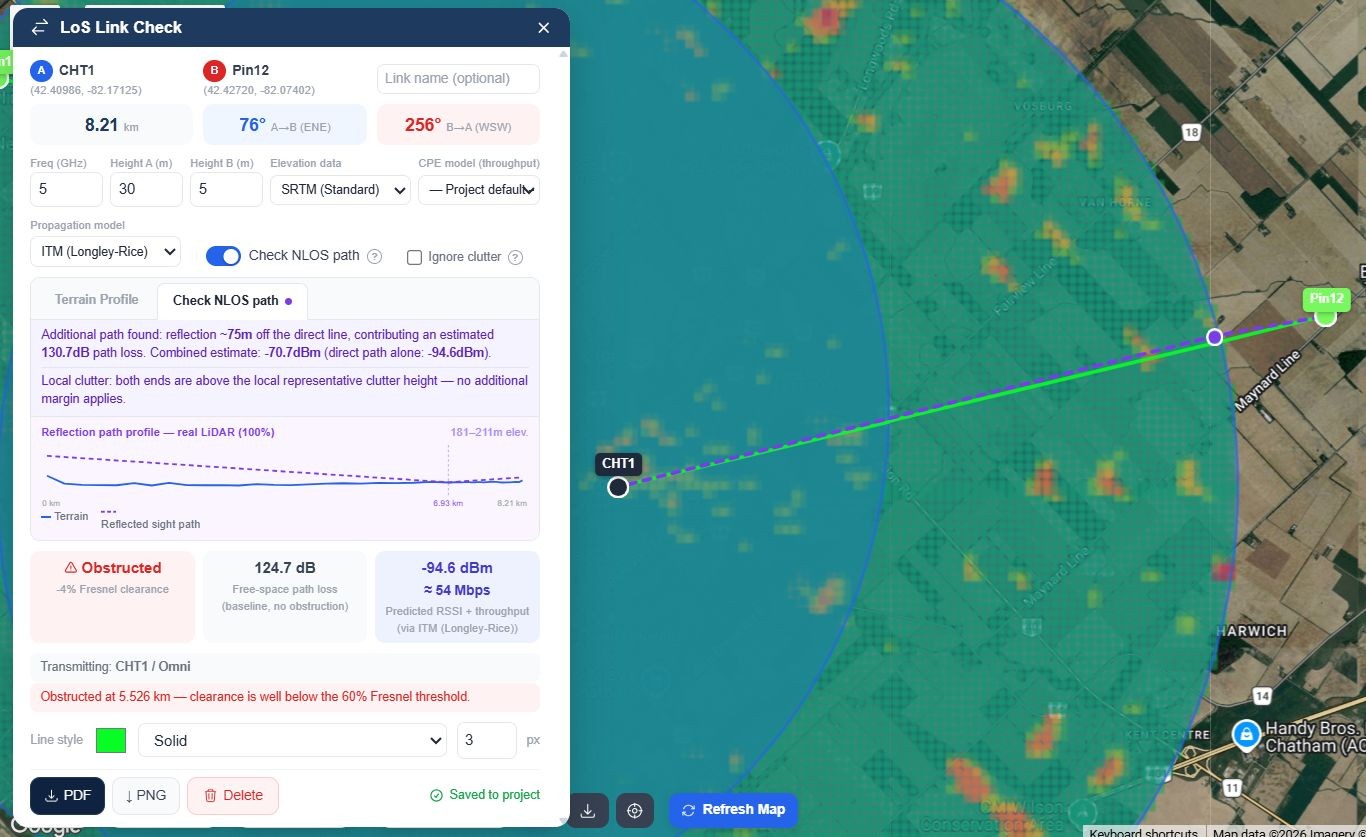
GridVisio line-of-sight link check — terrain profile, Fresnel zone, obstruction detection

A real link check: terrain profile, Fresnel zone and obstruction detection on measured surface data

Why WISPs in Switzerland and Liechtenstein end up here

Fixed wireless in Switzerland and Liechtenstein rarely means flat, open ground. The elevation pipeline, plan limits, and export options here were built around that, not adapted from a US tool afterward.

Real swisstopo elevation, not SRTM

swisstopo's swissSURFACE3D — a 0.5m surface model covering all of Switzerland and Liechtenstein — is used automatically. swisstopo keeps re-flying the country; where a spot has been flown more than once, the newest flight is used, so a building that has since gone up isn't missed. No setting to enable.

Real backhaul distances, not last-mile only

10km link length on Starter, 20km on Pro — enough for a genuine ridge-to-valley or across-the-lake hop, not just a last-mile drop. Fresnel clearance, bearing, and FSPL computed the same way at any length.

Honest verdicts, not a confident guess

Clear, Borderline, or Obstructed — Borderline is flagged as inconclusive instead of rounded up either way. If a link result ends up in front of a funder, a partner, or your own install crew, it says the same thing every time it's opened.

Predicted signal, not just geometry

ITU-R P.1812 propagation prediction alongside the Fresnel check, extending to ITM or FSPL+P.526 outside its frequency range — a dBm number and, with a CPE model selected, an estimated Mbps. The same engine drives the RF Heatmap so numbers never contradict each other.

Find where to build next

Import your own subscriber list and GridVisio clusters unserved locations by density (DBSCAN), then estimates reach from a hypothetical tower before you commit to a site visit — one more way to compete on the ground where satellite alternatives are weakest: dense clusters, business-grade latency, an install crew that actually turns up.

Coverage widget for your own site

Embed an address-check widget on your website. A visitor's address gets a real LoS check against your nearest towers, not a polygon overlap — so the lead you receive already tells you which tower would serve them.
A mountainside doesn't care that a competitor's tool assumed flat ground

A backhaul link up a steep alpine valley, a hop across a lake, a tower on a Jura ridge reaching into the farmland below — these are exactly the cases where a coarse 30m elevation model quietly gets the answer wrong. swisstopo's 0.5m surface model catches the spur, the tree line, or the roofline a generic DEM smooths straight through. Antenna heights are measured from swisstopo's own bare-earth model (swissALTI3D) under each end.

Links that cross the border work too: on the French side GridVisio uses IGN's own LiDAR HD, so a link from Geneva into France is measured on both sides. swisstopo's data is used only inside Switzerland and Liechtenstein; elsewhere the result falls back to a land-cover estimate and says so. Every result tells you which source it actually used, so you always know how much weight to put on the number in front of you.

GridVisio terrain profile with Fresnel zone overlay

Fresnel clearance computed against real measured surface data, not a smoothed approximation

One coverage map, every layer you actually maintain

Towers and sectors, subscribers, saved LoS links, unserved clusters — all on one map, toggleable by layer. Run an RF Heatmap per sector or per tower and see predicted signal strength across your whole footprint, using the same propagation model as the link checker.

Export a clean PDF or PNG of any link check for a customer file, an internal record, or a funding or partner application — no extra formatting step, no per-file fee.

GridVisio RF coverage heatmap over a WISP service area

RF Heatmap for a sector, driven by the same propagation engine as the LoS checker

Frequently asked questions

Does GridVisio cover my part of Switzerland or Liechtenstein?
Yes. swisstopo's swissSURFACE3D covers all of Switzerland and Liechtenstein, and GridVisio uses it automatically for every link check, heatmap and coverage widget check there. Where a link or heatmap reaches across the border, the French side uses IGN's LiDAR HD; in Germany, Italy and Austria it falls back to a land-cover estimate. Every result states which source it used, so you're never guessing.
What's the difference between swisstopo's data and the SRTM data most tools use everywhere?
SRTM is a 30m-resolution global radar dataset — fine for a rough first pass, but it can average away a ridge, a row of trees, or a roofline that sits inside a single 30m cell. swisstopo's swissSURFACE3D is a 0.5m surface model from airborne LiDAR, so features that actually intrude on a Fresnel zone show up instead of getting smoothed out.
Can I use the results in documentation for a municipality, a partner or a funding request?
GridVisio isn't a filing tool for any specific funding or permit process and doesn't generate application forms. What it gives you is exportable, defensible link and coverage data — terrain profile, Fresnel clearance, predicted signal strength — as a PDF or PNG you can attach to whatever documentation a given request requires.
Is pricing in Swiss francs?
Billing is in USD — $19/month Starter, $39/month Pro, both with a 14-day free trial and no credit card required to start. There's also a permanent $0 Free plan with core Starter features included.
Do I need to import my own subscriber and tower data?
Yes — towers, sectors, and subscribers are imported via CSV/XLSX or entered directly on the map. Once they're in, white area detection, reach estimates, and the RF Heatmap all run against your real network, not a sample dataset.

See your own network on real Swiss terrain

14-day free trial — LoS checker, RF heatmap, white area detection, and more. No credit card required.

Start free trial