Map it. Predict it. Capture the lead.

See your coverage.
Predict your signal.

GridVisio combines sector mapping, terrain-aware line-of-sight checks, and a multi-model (ITU-R P.1812, ITM, FSPL+P.526) propagation heatmap with a lead-capture widget for your website — built for WISPs, not adapted from something else. No per-file export fees, ever.

No credit card required GDPR Compliant No export fees
14
Day free trial
$0
Free tier forever
100%
Hardware agnostic
$0
Per-file export fees
5.8 GHz MAIN-01 LIVE 50.8503°N 4.3517°E WGS84 · Lambert 72 27 subscribers · 1 tower active

Everything a modern WISP needs

From complex tower planning to automated subscriber management. No clunky desktop software, just a fast web application.

See how GridVisio compares to other coverage tools →

Interactive Coverage Map

Visualize towers, directional and omni sectors, and subscriber locations on a satellite map with real-time filtering by frequency, status, and coverage.

Tower & Sector Management

Add and edit towers with full sector configuration — azimuth, beamwidth, radius, frequency band, colour-coded coverage shapes. Save your own equipment presets (or start from built-in Ubiquiti, Cambium, and Mimosa specs) to fill sector RF parameters in one click. Edit directly on the map.

Subscriber Tracking

Import thousands of subscribers via CSV or XLSX. Coverage status (served/unserved/potential) is calculated automatically whenever towers change.

LoS Link Check & Fresnel Zone

Validate line-of-sight between any two map points. Terrain cross-section with first Fresnel zone overlay gives a Clear / Borderline / Obstructed verdict — not a coin-flip binary — with bearing, free-space path loss, and real LiDAR data used automatically where available in the US (USGS 3DEP), Canada, UK, France, the Netherlands, Spain, and New Zealand. Export as PDF or PNG.

Learn more about LoS Link Check →

3D Corridor Check Pro

See the link, not just the numbers. An interactive 3D view of the actual LiDAR terrain and surrounding buildings along the corridor — orbit, zoom, and fly from one antenna to the other, with the same real Fresnel zone geometry as the 2D check drawn right on top. Click anywhere in the 3D scene to jump the 2D map to that exact spot.

Learn more about 3D Corridor Check →

RF Propagation Heatmap Pro

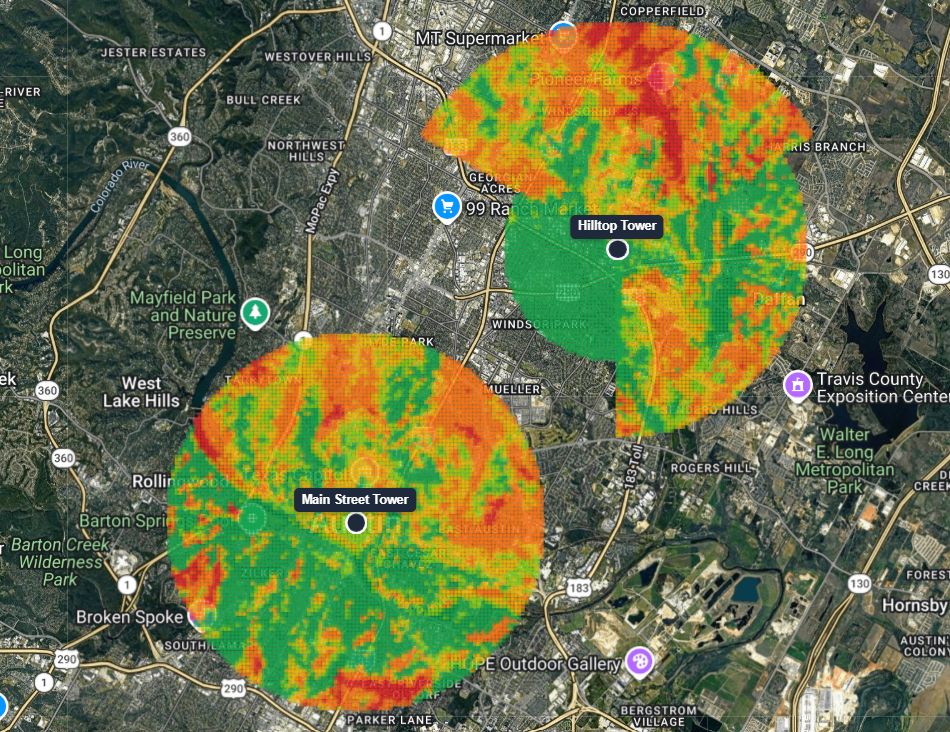
Predict signal strength across your whole coverage area with ITU-R P.1812 (extending automatically to ITM and FSPL+P.526 for backhaul and mmWave frequencies), standards-based propagation models — not a flat radius circle. Computed from real terrain, land cover, and each sector's actual transmit power and antenna gain. Multi-color layer for internal planning, plus a single-color "covered / not covered" view for public shared map links.

Learn more about the RF Coverage Heatmap →

Rooftop Scan Pro

Click a rooftop on the map and GridVisio auto-detects the building's real footprint (OpenStreetMap outline, falling back to a live LiDAR scan when OSM has no data for that address), scans a ring of realistic mounting points around its edge against your chosen tower, and surfaces the single best spot — using the exact same dense, real-LiDAR-merged terrain profile as a manual LoS Link Check, not a coarser approximation. No more guessing a point and checking it by hand.

Learn more about Rooftop Scan →

POP Scan Pro

Click any point on the map — an address, a subscriber, an existing tower, or just a spot — and GridVisio finds every tower/sector whose coverage geometrically reaches it, checks line of sight to each one individually, and ranks them by predicted signal strength. No more drawing and comparing links to each candidate POP by hand, one at a time. Every check runs through the exact same engine as a manual LoS Link Check — never a coarser batch shortcut — so results are exactly as reliable as if you'd drawn each link yourself.

Learn more about POP Scan →

Interference Analysis

Find sectors that could realistically interfere — co-channel or adjacent-channel, summed across every overlapping sector, not just the worst pair — and see a real predicted carrier-to-interference number, not just a shape on a map.

Learn more about Interference Analysis →

White Area Detection

Automatically identify clusters of unserved subscribers using DBSCAN spatial clustering. Visualize coverage gaps as polygons to guide new tower placement.

Learn more about White Area Detection →

Drive Test Overlay

Import GPS-timestamped signal strength measurements and overlay them on the map as a colour-coded track. See real measured signal vs planned coverage.

Lambert Converter

Convert between WGS84 lat/lng and Belgian Lambert 72, 2008, and 2005 coordinate systems directly on the map. Click any point to read formats.

Shared Map Links

Share read-only map views with clients, stakeholders, or regulators via a secure token-based link with optional expiry. No account required to view.

Coverage Widget & Lead Capture Starter

Embed a live serviceability checker on your website with one line of code. Visitors check their address — you get a qualified, line-of-sight-validated lead delivered to your inbox instantly. Three modes: coverage check only, lead form first, or coverage-then-capture. Leads land in your GridVisio inbox with per-tower LoS analysis attached (Pro adds predicted RSSI/throughput). Push leads to your billing system via webhook or Zapier, or call the same check directly from your own server via the public API.

Learn more about the Lead Widget →

Exports & BDC/BEAD

Export coverage data as PNG, PDF, XLSX, CSV, or KMZ (Google Earth / GIS). Generate BDC filings and a complete BEAD grant package — PDF report, location inventory, and white-area maps — with automatic terrain and signal verification built in, directly from your data.

Learn more about BDC/BEAD export →
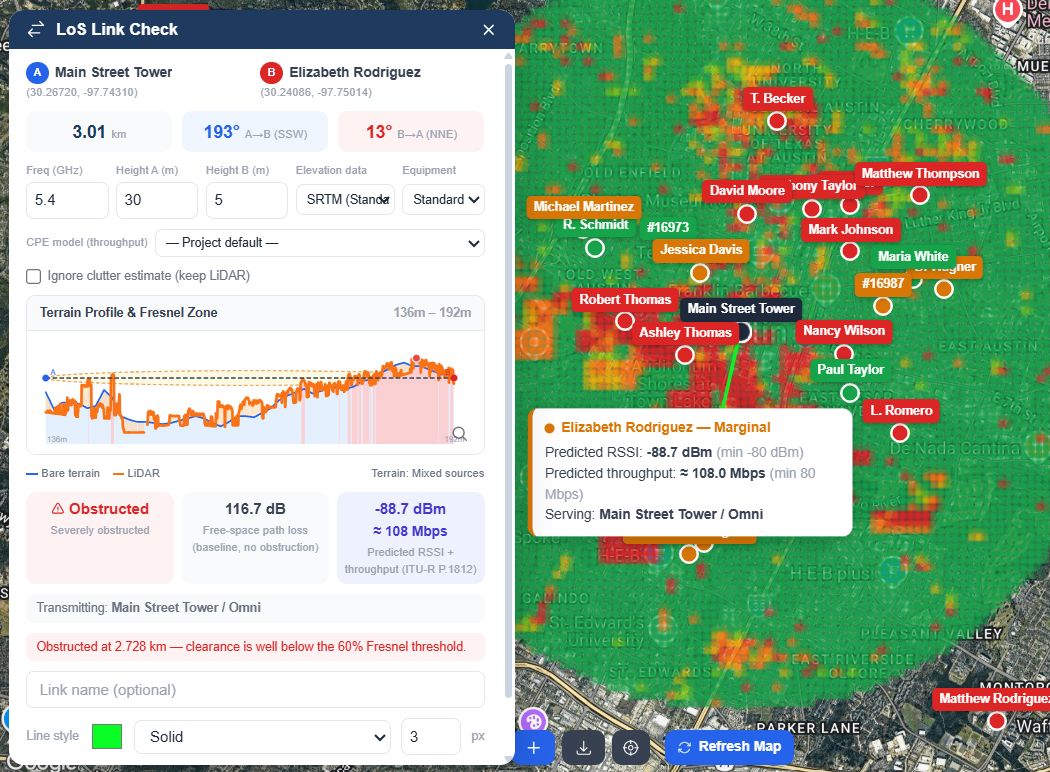
GridVisio LoS Link Check — terrain profile, Fresnel zone, obstruction at 0.53 km, 111.6 dB FSPL
LoS Link Check & Fresnel Zone

Know before you climb the tower

Click any two points on the map and get a real terrain cross-section with the first Fresnel zone overlaid — not a guess. Real USGS 3DEP LiDAR data is used automatically where available in the US, with clutter-aware vegetation and building height everywhere else.

  • Clear / Borderline / Obstructed verdict — not a coin-flip binary
  • Real LiDAR-measured terrain, automatically, where available: US (USGS 3DEP), Canada (NRCan HRDEM), UK, France, Netherlands, Spain, New Zealand (more to be added)
  • Bearing, path loss, predicted RSSI and throughput (Mbps) and exportable PDF/PNG report
  • On-demand NLoS reflection / multipath path check plus a statistical clutter margin (ITU-R P.2108) for Borderline or Obstructed links — useful extra context if you deploy Tarana or other NLoS-capable radios
See how it works

Turn your website into a lead machine

One line of code on your site. A qualified lead in your inbox every time someone checks their coverage. Line-of-sight validated, not just a polygon check.

Instant address check

Visitor enters their address or drops a pin. The widget runs a real line-of-sight analysis to your nearest towers and returns a serviceable / marginal / not-served verdict in seconds.

Lead in your inbox

The moment a visitor submits, you get an email with their contact details, address, best-serving tower, and the per-tower LoS analysis. The lead also lands in your GridVisio inbox.

Push to your billing system

Send leads to any billing or CRM system via webhook or Zapier. Splynx, UISP, Sonar, or any custom endpoint — one signed payload, delivered instantly.

Three modes, your choice

Coverage check only (passive), lead form first (capture before showing result), or coverage-then-lead (show result, then capture contact). Configure per project from your dashboard.

Learn about the Lead Widget Start free trial
RF Propagation Heatmap

See predicted signal strength, not a coverage circle

Every point on the map computed individually from real terrain, land cover, and each sector's actual transmit power and antenna gain — using ITU-R P.1812, ITM (Longley-Rice), and FSPL+ITU-R P.526, the same standards-based propagation models used by professional RF planning tools.

  • Multi-color signal-strength layer for internal planning
  • Single-color "covered / not covered" view for clients, on a public shared map link
  • Generate per sector, tower, or your entire project in one click
See how it works
GridVisio RF Propagation Heatmap — ITU-R P.1812 signal-strength layer shown in the map's Layers panel

Up and running in minutes

No local installations required. Open your browser and map your network immediately.

Step 01

Create your project

Set up a project for your network deployment. Configure default sector settings, marker colours, and analysis parameters.

Step 02

Add your towers

Place towers by clicking the map or entering coordinates — or import your whole tower list via CSV/XLSX in one step. Add sectors with direction, beamwidth, radius, and band.

Step 03

Import subscribers

Upload your subscriber list via CSV or XLSX. Coverage status is calculated automatically — served, unserved, or potential.

Step 04

Analyse & plan

Run white area detection, check coverage overlap, overlay drive test data, and identify where your next tower should go.

Start free. Upgrade as you scale.

All plans include a 14-day free trial of Starter features. No credit card required to start.

Free
$0 /mo
For individuals exploring the platform and testing capabilities.
  • 1 project
  • 5 towers
  • 100 subscribers
  • CSV export
  • XLSX / PDF export
  • PNG map export
  • CSV / XLSX import
  • Drive test import
  • KMZ export (Google Earth / GIS)
  • Coverage map
  • 3 saved temp pins
  • 1 project link (ephemeral)
  • Saved project links
  • White area detection
  • Interference Analysis
  • BDC / BEAD export
  • Shared map links
  • Team collaboration
  • Lambert coordinate converter
  • LoS Link Check / Fresnel zone
  • Regional LiDAR up to 5 km
  • RSSI extend beyond radius (capped 5 km reach)
  • Elevation: SRTM & Copernicus GLO-30
  • RF Propagation Heatmap
  • Rooftop Scan
  • POP Scan
  • 3D Corridor Check
  • Coverage Widget
Get started free
Best way to start
Trial
$0 / 14 days
Full Starter access, no credit card needed.
  • 3 projects
  • 20 towers
  • 1,000 subscribers
  • CSV / XLSX / PDF export
  • PNG map export
  • CSV / XLSX import
  • Drive test import
  • KMZ export (Google Earth / GIS)
  • 20 saved temp pins
  • 50 saved project links
  • White area detection
  • Interference Analysis
  • BDC / BEAD export
  • 10 shared map links
  • 3 collaborator seats
  • Lambert coordinate converter
  • LoS Link Check / Fresnel zone (+ predicted RSSI/throughput, NLoS reflection check)
  • Regional LiDAR up to 10 km
  • RSSI extend beyond radius (capped 10 km reach)
  • Elevation: SRTM & Copernicus GLO-30
  • RF heatmap (5 km radius preview)
  • Rooftop Scan
  • POP Scan
  • 3D Corridor Check
  • Coverage Widget (3 towers, + RSSI/Mbps, incl. Public API)
Start free trial
What happens after the 14-day free trial?
Your account will automatically downgrade to the Free plan. You won't be charged anything because we don't ask for a credit card upfront. If you want to keep the premium features, you can upgrade to Starter or Pro at any time from your billing dashboard.
Can I upgrade or downgrade my plan later?
Yes, absolutely. You can upgrade, downgrade, or cancel your subscription at any time. If you upgrade in the middle of a billing cycle, the cost will be prorated. If you cancel, you will maintain premium access until the end of your current billing period.
Are my network and subscriber data secure?
Data security is our top priority. GridVisio is fully GDPR compliant and hosted on secure servers in the European Union. All data transfers are encrypted via SSL, and we never sell or share your proprietary network or subscriber information with third parties.
How does the coverage widget and lead capture work?
You embed a single iframe or script tag on your website. Visitors enter their address or drop a pin on a map — the widget runs a real line-of-sight analysis to your nearest towers and returns an instant verdict. When a visitor submits their contact details, you get an email with their name, contact info, best-serving tower, and per-tower LoS analysis. Leads also appear in your GridVisio inbox and can be pushed to your billing system via webhook or Zapier. The widget is available on the Pro plan.
Does GridVisio help with FCC BDC and BEAD grant filings?
Yes. GridVisio generates FCC BDC (Broadband Data Collection) availability files and a complete BEAD grant package directly from your tower and subscriber data — a ZIP with a formatted PDF report, a location inventory CSV, and a white-area GeoJSON map. Every BEAD export automatically runs a real terrain and line-of-sight check for each location — no separate verification step. All exports are included in your subscription at no per-file fee — unlike some competitors who charge per export. Available on Starter and Pro plans.
What is the RF Propagation Heatmap and who is it for?
It predicts signal strength across your whole coverage area using ITU-R P.1812 (with automatic ITM/FSPL+P.526 fallback for backhaul and mmWave), standards-based propagation models, instead of a flat radius circle — computed from real terrain, land cover, and each sector's actual transmit power and antenna gain. A multi-color layer is for your own internal planning; a single-color "covered / not covered" view can be shown on a public shared map link, no account required. It's a statistical prediction, not a measurement, and we're upfront about that. Available on the Pro plan; the 14-day trial gets a 5 km-radius preview. Learn more →

Trusted by WISP operators

Join operators who use GridVisio to plan smarter and grow faster.

"GridVisio transformed how we plan new tower deployments. The white area detection alone saved us weeks of manual analysis."

M. Vandenberghe
Network Director, Belgian WISP

"The Lambert coordinate converter is a lifesaver. We work with Belgian topographic data daily and switching between systems used to be a pain."

J. Dubois
Field Engineer, ISP Operator

"We imported 3,000 subscribers in minutes and immediately saw which areas had no coverage. Incredibly powerful for a SaaS at this price point."

P. Kowalski
CEO, Rural Broadband Provider
Get in touch

We're here to help

Have questions?

Whether you're evaluating GridVisio, need help with a specific deployment, or want to request a feature — our engineering team responds fast.

EXODATA SRL · Romania · EU