Network Resilience

Which customers would you lose
if one tower went down?

Your coverage map shows who is served. It doesn't show who is served by exactly one tower. GridVisio's Redundancy view colours the same subscriber markers by how many separate towers could actually serve each customer — so single points of failure stand out before an outage finds them for you.
Start 14-day free trial See all features
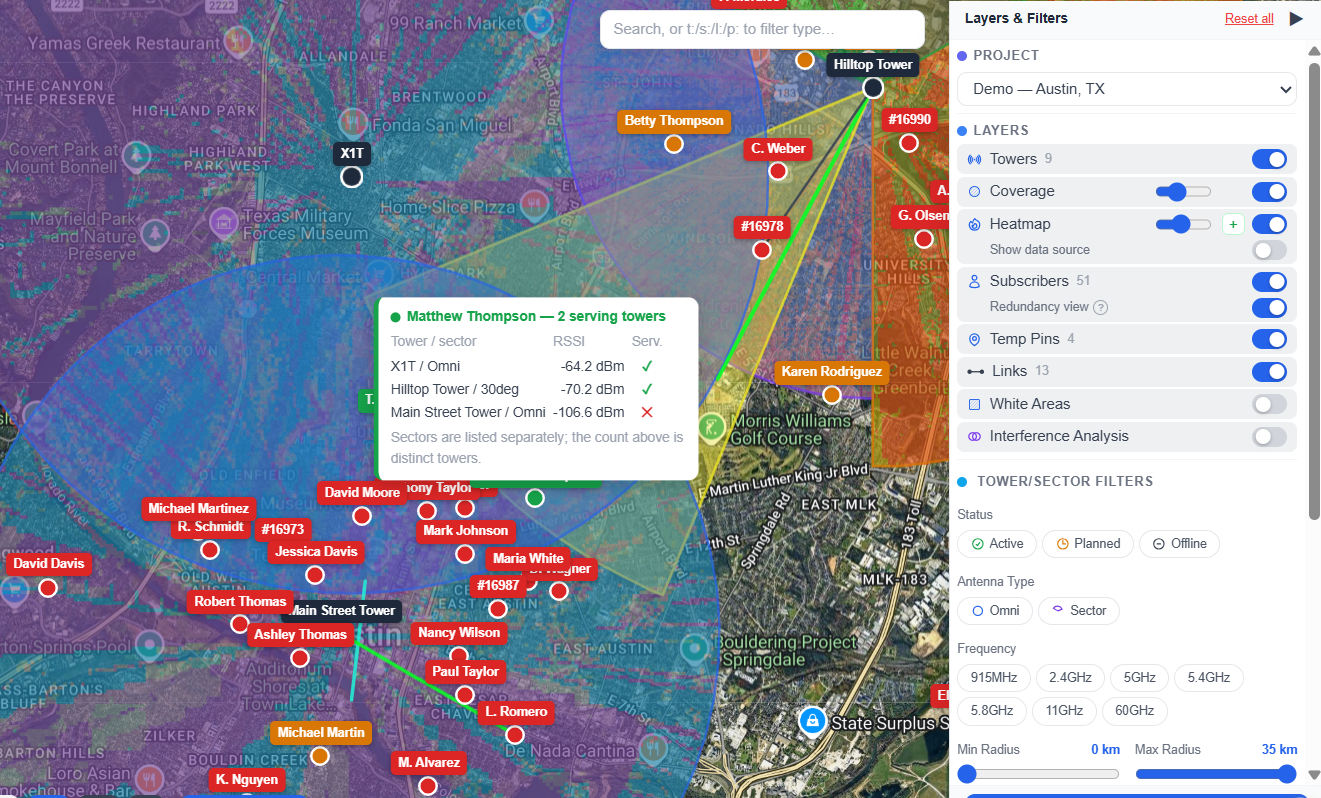
GridVisio Redundancy view — subscriber markers coloured green, amber and red by how many towers can serve each one

The same subscribers, coloured by how many towers can reach them
One map, two questions

Coverage asks "is this customer served?" Resilience asks "what happens when the tower serving them stops?" Most planning tools only answer the first.

Green is not always green

On a normal coverage map, a subscriber reachable by four towers and a subscriber clinging to one marginal link are the same shade of green. They are not the same business risk.

Flip the Redundancy view toggle, right under the Subscribers layer, and the map re-colours in place — same markers, same positions, different question:

2+ towers — has a fallback
1 tower only — single point of failure
No tower — not servable today

Filter to just the amber ones and you have a concrete work list: the customers whose service depends entirely on one site staying up.

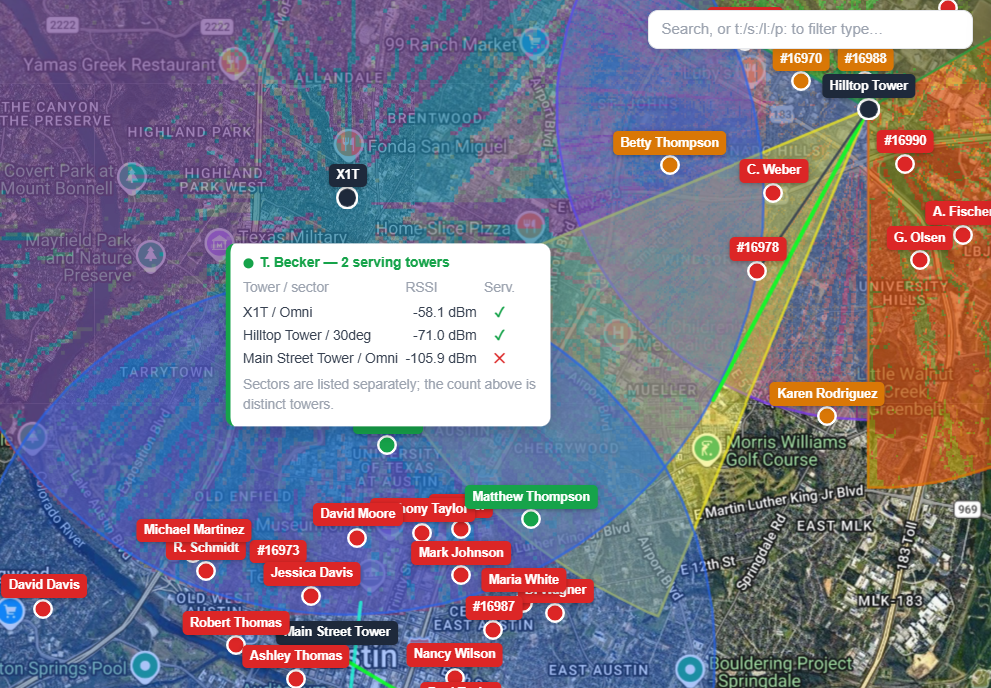
Hovering a subscriber in Redundancy view — a table of every tower and sector that reaches it, with predicted signal and whether each option is strong enough to count

Hover any subscriber to see exactly which towers could serve it

What makes a tower count

Being in range is not the same as being a real option. A fallback that can't carry the customer isn't a fallback.

Signal-checked, not drawn on a circle

Every candidate tower is tested with the same terrain- and LiDAR-aware propagation engine as the rest of GridVisio, then measured against your own project's signal thresholds. An option that's geometrically in range but too weak to sell is listed — and explicitly does not count.

Towers are counted, not sectors

Two sectors on the same tower are still one tower. If that site loses power, both go with it. GridVisio counts distinct towers, so a subscriber covered twice from one mast is correctly flagged as a single point of failure — not quietly marked redundant.

Every option, listed

Hover a subscriber for a compact table of every tower and sector that reaches it, best first, with the predicted signal for each and a tick or cross for whether it genuinely qualifies. No guessing which tower the fallback would actually be.

Stays current on its own

Redundancy updates whenever coverage is reclassified — adding, moving, editing or removing a tower or sector, or changing a subscriber. There's no separate report to remember to re-run.

No extra computation, no extra wait

This isn't a new analysis bolted on top. When GridVisio classifies coverage, it already tests every tower and sector that could reach each subscriber, at full precision — then keeps the best one and discards the rest.

The Redundancy view simply keeps what was already being calculated. Turning it on costs no additional terrain lookups, no additional propagation runs, and no additional time on your coverage recalculations.

Existing projects need one coverage recalculation to fill in the history — GridVisio offers it the first time you open the view, and never starts it without you asking.

Redundancy view across a full subscriber base, showing the proportion of customers dependent on a single tower

Resilience across an entire subscriber base at a glance

Where this actually gets used

Redundancy data turns a vague worry into a sorted list.

SituationWhat the Redundancy view tells you
Planned maintenance on a towerExactly which customers have no alternative and will genuinely go dark — so you can notify the right people instead of all of them.
Deciding where the next tower goesA cluster of amber subscribers is a resilience case for a site, separate from the coverage case white area detection already makes.
Retiring or relocating a siteWho loses service entirely versus who simply fails over, before the decision is made rather than after.
Selling an SLA or business tierWhich addresses can honestly be offered a resilient service today, and which would need another tower first.
Grant and funding documentationEvidence about network robustness, not just coverage extent.

Frequently asked questions

What exactly is being counted?
The number of distinct towers that could each independently serve that subscriber to your project's own signal standard. Two sectors on the same tower count once, because losing the tower loses both. A tower that reaches the subscriber but only with a signal too weak to qualify is shown in the hover table and marked as not counting.
Is this measured or predicted?
Predicted — from terrain, LiDAR surface data and the same propagation models GridVisio uses everywhere else, at the same precision as a hand-drawn link check. It's a planning tool, not a measurement of live radio conditions. It tells you which towers could serve an address, not which one a given CPE is currently associated with.
Does it slow down coverage recalculation?
No. The per-tower signal checks it relies on were already running for every candidate during classification — the alternatives were simply discarded once a winner was picked. This view keeps them instead of throwing them away, so no extra terrain or propagation work is involved.
Why are all my subscribers grey the first time?
Grey means "not computed yet" — the alternate towers weren't stored before this view existed, so an existing project has no history to show. GridVisio offers a one-off coverage recalculation the first time you open the view; after that it stays current automatically. It never starts that recalculation on its own.
Does it need any particular settings?
It needs signal verification switched on for the project — RSSI classification or throughput qualification — because that's what produces the per-tower signal figures being compared. On a project using purely geometric coverage, the view will tell you so directly rather than showing an empty map.
What plan do I need?
The Redundancy view is included on Pro ($39/month). The 14-day free trial includes full Pro-tier access — no credit card required. On other plans the toggle is still visible so you can see what it offers, just not switch to it.

Find your single points of failure

Import your subscribers, add your towers, and see which customers depend on exactly one site. 14-day trial, no credit card.

Start free trial